PWA on Any Device
Goldex installs as a Progressive Web App directly from your mobile browser - no Google Play or App Store listing required. The home-screen icon launches the full site in full-screen mode.
Everything About the App at Goldex Casino
Install the Goldex Progressive Web App on any Android or iOS device in two taps - no app store, no download. Full pokies library, Evolution Gaming live tables and AUD cashier available instantly.
Goldex on Mobile
Install the Goldex Progressive Web App on any Android or iOS device in two taps - no app store, no download. Full pokies library, Evolution Gaming live tables and AUD cashier available instantly.
Open on Mobile Play responsibly. You must be 18 or older, and gambling carries a risk of addiction. Bonus terms apply.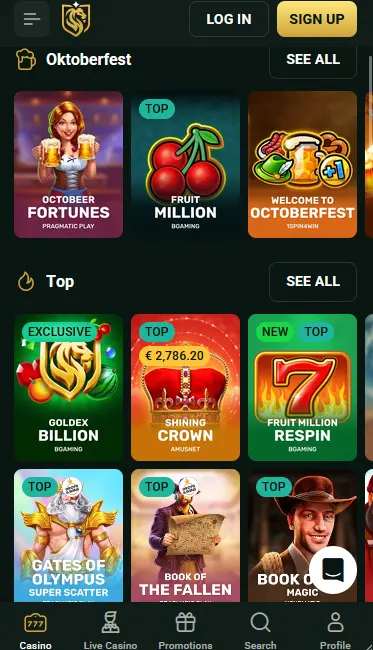
Goldex Mobile: Pros and Cons
Pros
Cons
Stay Safe on Mobile
What You Should Do
What You Should Avoid
How to Install Goldex on Your Phone
What the Goldex Mobile Experience Delivers
PWA on Any Device
Goldex installs as a Progressive Web App directly from your mobile browser - no Google Play or App Store listing required. The home-screen icon launches the full site in full-screen mode.
Fast Load, No Storage Hit
The PWA is lightweight compared to a native app download. Pages cache for speed after first load, and games from Pragmatic Play and Evolution Gaming stream smoothly on standard 4G connections.
Encrypted Payments on Mobile
All deposits and withdrawals processed through the Goldex mobile cashier use the same SSL encryption as the desktop site. Visa, Neosurf, Apple Pay and cryptocurrency are all available in the mobile cashier.
Device Requirements
Android
iOS
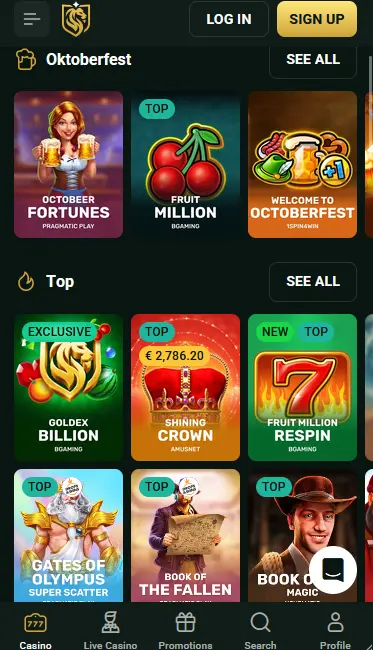
The Goldex mobile experience delivers the complete casino catalogue through a browser-based Progressive Web App rather than a native iOS or Android application. Every section available on the desktop site - pokies, live casino, jackpot games, the cashier and bonus centre - is accessible from a phone or tablet without requiring a download from a store.
The most significant advantage of the PWA approach is the absence of platform restrictions. Because there is no App Store or Google Play listing, the full real-money gaming catalogue is available without the content limitations that app stores impose on gambling titles. The mobile browser becomes the gateway to 11,000+ games, and installing the PWA shortcut makes the experience functionally equivalent to a native app in terms of access speed and display.
The PWA shortcut runs in full-screen mode, removing the browser address bar and navigation chrome for a cleaner display. The login session also persists between visits when using the PWA icon, unlike a standard browser tab that may require you to sign in again after closing. All other features - game library, cashier, live chat, bonus balance - are identical between the standard mobile browser and the installed PWA shortcut.
Goldex is designed to run on any modern smartphone or tablet browser. The platform automatically adjusts its layout to the screen dimensions and input method of the device.
Chrome on Android is the recommended browser for installing the Goldex PWA. Android 8.0 and later versions are recommended for stable performance, though the site loads on earlier versions via the browser without the PWA installation option. The install prompt appears in Chrome’s three-dot menu as “Add to Home Screen” or “Install App” depending on the Chrome version.
Safari on iPhone or iPad is required to install the PWA shortcut on iOS devices. The Share icon at the bottom of the Safari browser opens the option to “Add to Home Screen,” which places the Goldex icon on your device. iOS 14 or later is recommended. Other browsers on iOS (Chrome, Firefox) can access the site but do not support PWA installation due to Apple’s platform restrictions.
| Platform | Browser | OS Version | Install Method |
|---|---|---|---|
| Android | Chrome (current) | Android 8.0+ recommended | Three-dot menu > Add to Home Screen |
| iOS | Safari (required) | iOS 14+ recommended | Share icon > Add to Home Screen |
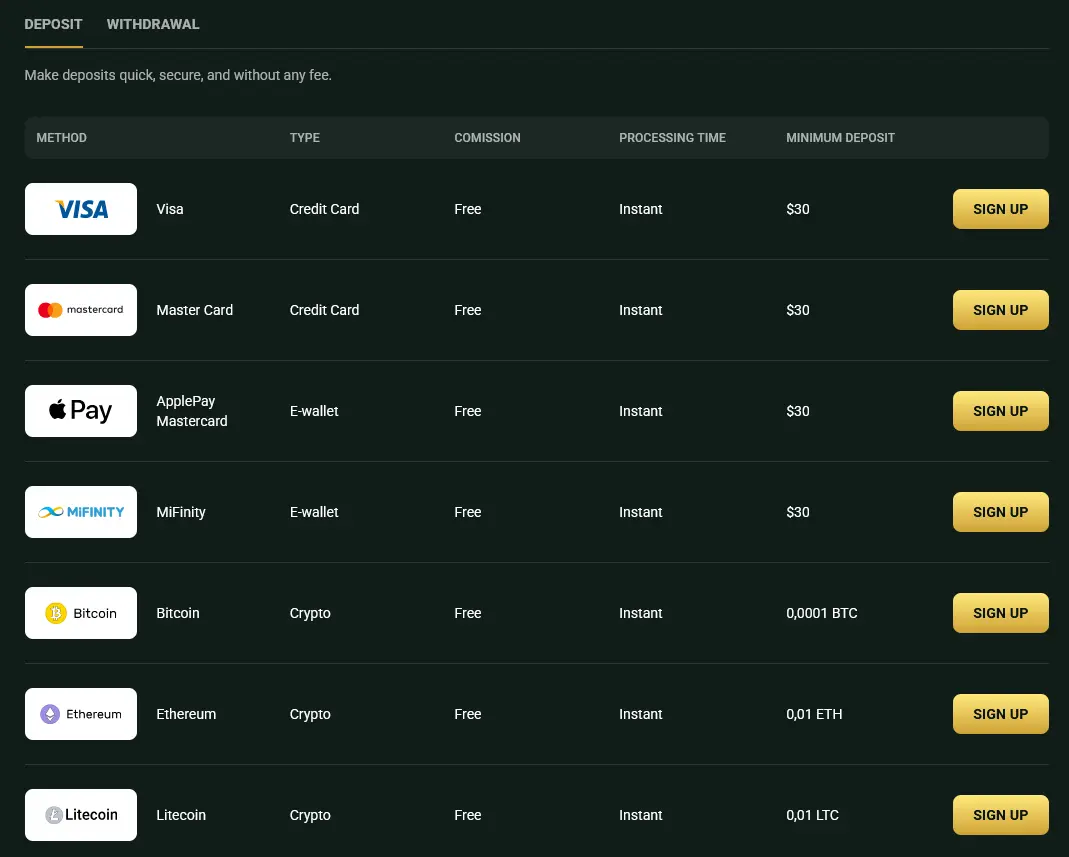
The mobile cashier at Goldex mirrors the desktop cashier in full. Visa, Mastercard, Neosurf, Apple Pay, MiFinity and a range of cryptocurrencies including Bitcoin, Ethereum, Litecoin, Dogecoin and Tether (USDT) are all available. Neosurf is a particularly convenient option for Australian players on mobile because vouchers can be purchased at local newsagents without requiring a bank card or e-wallet account.
| Method | Deposit | Withdrawal |
|---|---|---|
| Visa / Mastercard | Instant | 3-7 banking days |
| Neosurf | Instant | Deposit only |
| Apple Pay | Instant | 3-7 banking days |
| MiFinity | Instant | 3-7 banking days |
| Bitcoin / Ethereum | Instant | Instant |
| USDT | Instant | Instant |
| Bank Transfer | Instant | 3-7 banking days (min. $500) |
All payment processing on the Goldex mobile cashier uses SSL encryption. The platform partners with established payment providers including Visa, Mastercard and MiFinity, each of which brings its own fraud detection and verification layer. Cryptocurrency transactions are secured by the respective blockchain networks.
Goldex uses SSL encryption across every page of the mobile site, including the cashier, account management and live chat. The encrypted connection prevents third parties from intercepting data transmitted between your device and the Goldex servers, covering login credentials, personal information and payment details.
Two-factor authentication is available in your Goldex account security settings where offered. Activating it means a second verification step - typically a code sent to your registered email or phone - is required in addition to your password. This significantly reduces the risk of unauthorised account access even if your password is compromised.
On devices that support biometric authentication, using Face ID (iOS) or fingerprint recognition (Android) to lock access to your browser or PWA shortcut adds a physical security layer above your account credentials.
Over 9,500 pokies from Pragmatic Play, NoLimit City, Relax Gaming, BGaming, Play’n GO, NetEnt, Microgaming, Quickspin, Yggdrasil and Playtech are available in the mobile browser. High-volatility titles such as Big Bass Splash (RTP 96.71%) from Pragmatic Play, Book of Dead (RTP 94.25%) from Play’n GO and Gonzo’s Quest (RTP 95.97%) from NetEnt all run smoothly on a mobile connection. Bonus-buy slots allow players to purchase direct access to the bonus round, skipping the base game.
All 200+ live dealer tables from Evolution Gaming and Pragmatic Play Live stream in real time on mobile. The video feeds are optimised for mobile bandwidth, and the table interface scales to portrait and landscape orientations. Live blackjack, roulette, baccarat and game show titles from Evolution Gaming are all playable from a phone or tablet.
Standard (non-live) variants of blackjack, roulette, baccarat and poker load as RNG-powered games that operate identically on mobile and desktop.
The 90+ progressive jackpot pokies, including Age of the Gods from Playtech, Mega Moolah from Microgaming and WowPot, are all accessible on mobile. Progressive jackpot totals update in real time regardless of the device used to play.
If you prefer not to install the PWA shortcut, the Goldex site functions in full through any mobile browser without installation. Simply bookmark goldexplay.com for fast access. The only difference from the PWA shortcut is that the browser navigation bar remains visible and your session may require a fresh login after closing the browser tab.
New players can register directly from the mobile browser or PWA. Tap “Register” on the Goldex homepage, enter your name, email address, date of birth and chosen password, select AUD as your account currency, and confirm registration via the email link sent to your inbox. The full registration process takes under three minutes on a mobile device.
Enter your email and password on the Goldex sign-in screen. If you have installed the PWA shortcut, your session typically persists between visits so you do not need to sign in again every time you open the app. For security best practices and account recovery information, see the Goldex login guide.
Live chat is available 24/7 and is accessible from within the mobile browser and the PWA - look for the chat icon in the navigation. Logged-in players can reach a human support agent by selecting “Speak to an Agent” in the chat widget. Email support is available at [email protected] for non-urgent queries. The Help Centre, also reachable from the mobile site, includes FAQ articles covering payments, bonuses and account management.
Goldex includes a responsible gaming section accessible from any page. The minimum age for all games is 18. If you feel your gambling is becoming a problem, support organisations including Gambling Help Online are available around the clock. Goldex’s responsible gaming page links to external support services and includes guidance on recognising problematic gambling behaviours.
The full four-part welcome package - up to $57,000 and 500 free spins on Big Bass Splash by Pragmatic Play - is claimable through the mobile cashier. Enter promo codes GOLDEX1, GOLDEX2, GOLDEX3 or GOLDEX4 at the deposit screen on mobile exactly as you would on desktop. All bonus terms, including the 40x wagering requirement and seven-day validity, apply identically on mobile. 18+. Terms and conditions apply. For the complete breakdown of wagering requirements and game contributions, see the Goldex bonus guide.
Goldex Mobile: Common Questions
No - Goldex does not have a native application on either app store. The platform is accessible as a Progressive Web App (PWA) installed from the mobile browser, which provides a home-screen icon and full-screen experience without needing a store listing.
Yes - the full Goldex catalogue, including 9,500+ pokies from Pragmatic Play, NoLimit City and Play'n GO, 200+ live dealer tables from Evolution Gaming, and 90+ progressive jackpots, is available through the mobile browser or PWA.
Yes - the mobile cashier supports Neosurf, Visa, Mastercard, Apple Pay, MiFinity and cryptocurrency. You can enter a promo code (GOLDEX1 through GOLDEX4) at the deposit screen on mobile exactly as you would on desktop.
Install Goldex on Your Phone Now
Grab 325% up to $57,000 and 500 free spins.
Enter the Casino Play responsibly. You must be 18 or older, and gambling carries a risk of addiction. Bonus terms apply.